Zapier vs Make.com for AI Content Automation: Which is Better?
Compare Zapier and Make.com for AI content workflows. Deep dive into features, pricing, performance, and real-world scenarios to choose the right automation platform.
Jump to section
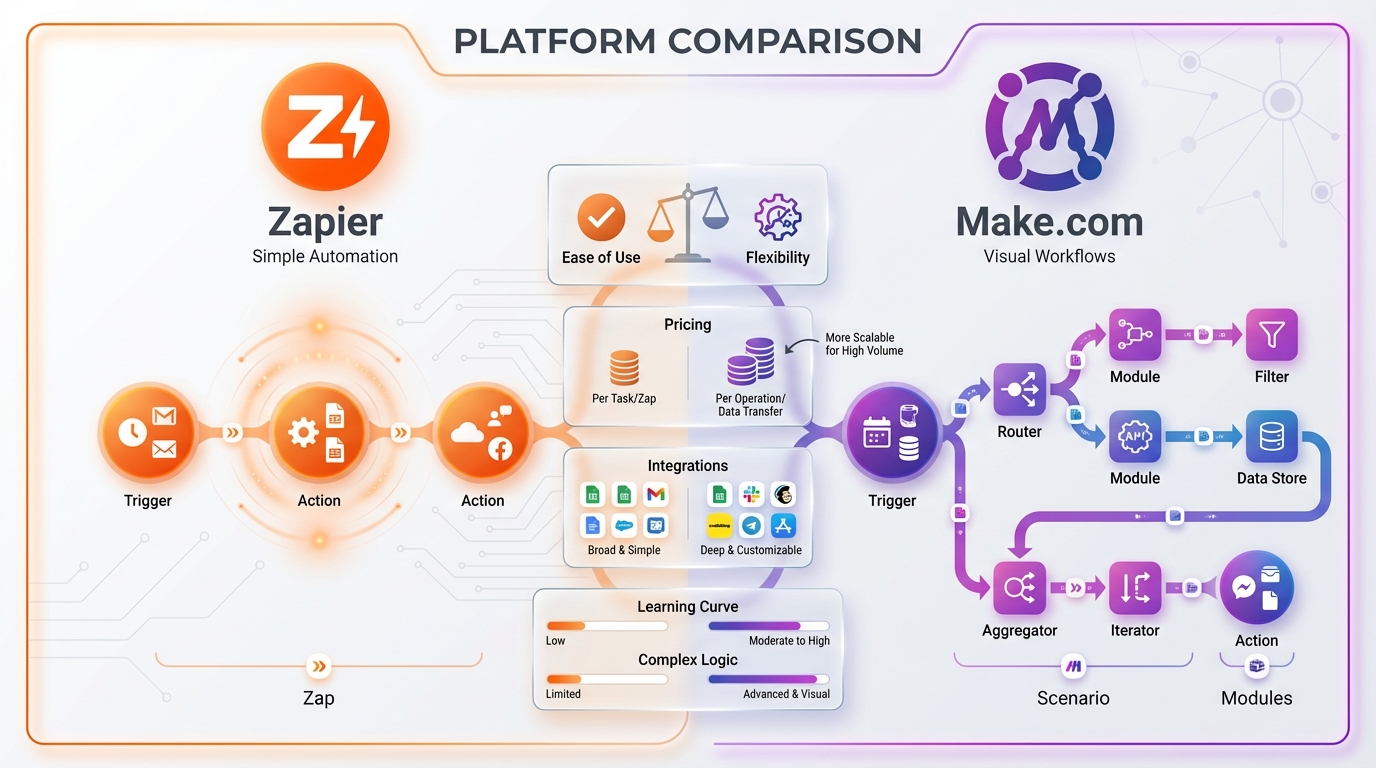
Choosing between Zapier and Make.com for AI content automation isn’t just about features—it’s about matching the right tool to your workflow complexity, budget, and technical comfort level. In 2026, both platforms have evolved into sophisticated automation ecosystems, but they serve different user profiles and use cases.
After researching both platforms extensively and analyzing real-world pricing scenarios, I’ve found that the decision often comes down to a simple question: Do you prioritize ease of use and extensive integrations, or do you need maximum control and cost efficiency for complex workflows? For a detailed guide on building workflows with Make.com specifically, check out our tutorial on AI content workflows with Make.com.
Understanding the Automation Landscape in 2026
The no-code automation space has transformed dramatically since AI tools became mainstream. What started as simple “if this, then that” workflows have evolved into sophisticated content production systems that can research topics, generate articles, create images, schedule social posts, and analyze performance—all without human intervention.
According to Make.com’s 2026 predictions, AI agents are becoming workflow engines that detect work, initiate actions, and complete multi-step tasks autonomously. Meanwhile, Zapier’s 2026 roadmap emphasizes AI-powered teammates that operate as specialized assistants across 7,000+ apps.
Both platforms are racing to become the operating system for AI-driven business operations, but they’re taking fundamentally different approaches.
Platform Overview: Core Philosophy
Zapier: Simplicity at Scale
Zapier built its reputation on making automation accessible to non-technical users. The platform uses a linear, step-by-step workflow design that mirrors how people naturally think about processes: “When this happens, do that, then do this.”
Core Strengths:
- Intuitive interface with minimal learning curve
- Largest app ecosystem (7,000+ integrations)
- Extensive AI marketplace (250+ AI apps)
- Zapier Copilot for natural language workflow creation
- Enterprise-grade reliability and support
Best For: Marketing teams, solopreneurs, agencies needing quick deployment, and organizations prioritizing ease of use over workflow complexity.
Make.com: Power and Flexibility
Make.com (formerly Integromat) appeals to power users who need granular control over their automations. Its visual, flowchart-style interface allows for complex branching logic, data manipulation, and error handling that would be difficult or impossible in Zapier.
Core Strengths:
- Visual workflow builder with drag-and-drop modules
- Advanced features: routers, iterators, data transformations
- Superior cost efficiency (20x cheaper at high volumes)
- Deeper API access within each integration
- Built-in debugging and execution history
Best For: Technical users, developers, agencies building client workflows, and budget-conscious businesses with complex automation needs.
AI Capabilities Deep Dive
Zapier’s AI Arsenal
Zapier has invested heavily in making AI accessible within workflows. The platform offers multiple ways to integrate AI:
1. Zapier Agents (2026 Feature)
Zapier Agents represent the platform’s most ambitious AI initiative. These are AI-powered teammates that you train with prompts to fulfill specific roles. For content workflows, you can create:
- Blog Writer Agent: Pulls research from web, generates drafts, stores in your CMS
- Social Media Scheduler: Adapts content for different platforms, schedules posts
- Analytics Agent: Monitors performance, suggests content optimizations
Agents have access to company data and can safely automate work across multiple apps simultaneously. Unlike traditional Zaps that follow rigid if-then logic, agents make decisions based on context and goals.
2. Built-in AI Tools
- ChatGPT Integration: Most flexible AI engine with uses for text generation, email rewriting, data classification, content summarization, and research automation
- AI Copilot: Describe workflows in plain English, get suggested Zap configurations
- 250+ AI App Integrations: Native connections to Jasper, Copy.ai, Surfer SEO, Frase, and virtually every major content AI tool
3. Practical Content Automation Examples
According to Zapier’s AI guide, common content workflows include:
- Monitor RSS feeds → Extract key points with ChatGPT → Generate social posts → Schedule across platforms
- New blog post published → Create meta descriptions with AI → Generate featured images with DALL-E → Update SEO tools
- Competitor content detected → Summarize with Claude → Store insights → Trigger content brief creation
Make.com’s AI Approach
Make.com takes a more modular approach to AI integration. Instead of a dedicated AI marketplace, the platform provides native modules for major AI providers that you can combine with unlimited flexibility.
1. Native AI Modules
As of 2026, Make.com supports:
- OpenAI (GPT-4, GPT-4 Turbo, DALL-E 3)
- Anthropic Claude API (Claude 3 Opus, Sonnet, Haiku)
- Google Gemini (Gemini Pro, Gemini Ultra)
- Stability AI (Stable Diffusion models)
Each module offers granular control over API parameters: temperature, max tokens, system prompts, response formats, and more.
2. Make AI Agents
Launched in spring 2025, Make AI Agents embedded agentic automation more deeply within processes. By 2026, these agents act as workflow engines that detect work, initiate actions, and complete multi-step tasks without human prompts.
Key difference from Zapier Agents: Make’s agents are designed to operate within complex, branching scenarios with conditional logic, while Zapier’s agents function more as standalone AI teammates.
3. Advanced AI Workflow Capabilities
Make.com excels at sophisticated content pipelines:
- Content Research Loop: API polling → Data extraction → AI summarization → Store in database → Repeat until criteria met
- Multi-Model Processing: Send content to GPT-4 for drafting → Claude for fact-checking → Gemini for SEO optimization → Combine outputs
- Dynamic Content Adaptation: Branch based on content type → Apply different AI models per branch → Merge results → Distribute to appropriate channels
Feature Comparison Matrix
| Feature | Zapier | Make.com | Winner |
|---|---|---|---|
| Total Integrations | 7,000+ apps | 2,400+ apps | Zapier |
| AI-Specific Apps | 250+ in marketplace | Native modules only | Zapier |
| Workflow Complexity | Linear, limited branching | Unlimited routers, iterators | Make.com |
| Visual Builder | Step-by-step list | Flowchart diagram | Make.com |
| Data Transformation | Basic formatting | Advanced parsing, mapping | Make.com |
| Error Handling | Automatic retry | Granular error routes | Make.com |
| Learning Curve | 1-2 hours | 8-12 hours | Zapier |
| Free Plan Operations | 100 tasks/month | 1,000 operations/month | Make.com |
| AI Copilot | Yes (unlimited use) | No | Zapier |
| Webhook Triggers | Instant (all plans) | Instant (paid plans) | Zapier |
| Execution Speed | Asynchronous (slower) | Faster for complex flows | Make.com |
| Mobile App | Yes (iOS, Android) | Yes (limited features) | Zapier |
| Team Collaboration | Advanced (Team plan+) | Available (Team plan+) | Tie |
| API Access Quality | Standard endpoints | Deeper, more granular | Make.com |
| Success Rate | 99.9% (8K+ tasks/month) | 99%+ | Tie |
Pricing Breakdown: The 20x Difference
Pricing represents the most dramatic difference between these platforms. Let’s break down real-world scenarios.
Zapier Pricing (2026)
Zapier uses a task-based pricing model where each action performed counts as one task:
Plans:
- Free: 100 tasks/month, single-step Zaps
- Professional: Starting at $19.99/month (750 tasks), multi-step Zaps, premium apps
- Team: $69/month (2,000 tasks), shared workspace, advanced admin
- Enterprise: Custom pricing (50,000+ tasks), SLA, premium support
Key Considerations:
According to Zapier’s pricing documentation, task consumption varies by trigger type:
- Polling Triggers: Consume tasks every time Zapier checks for new data (every 1-15 minutes depending on plan)
- Webhook Triggers: Only consume tasks when data is actually received (more efficient)
- Filters: Don’t consume tasks if conditions aren’t met
- AI Actions: Each AI API call = 1 task
Example Scenario: Content Publishing Workflow
Daily workflow: Monitor 10 RSS feeds → Extract article summaries (ChatGPT) → Generate social posts → Schedule to 3 platforms
- Polling 10 feeds every 15 minutes = 960 tasks/day (even if no new content)
- Processing 5 articles/day = 5 tasks (ChatGPT) + 15 tasks (scheduling) = 20 tasks/day
- Monthly Total: ~29,000 tasks
- Zapier Cost: ~$600/month (Team plan with extra tasks)
Make.com Pricing (2026)
Make.com uses an operations-based model where each module execution = 1 operation. As of 2026, Make transitioned to a credit-based system where AI operations may consume multiple credits.
Plans:
- Free: 1,000 operations/month
- Core: $9/month (10,000 operations)
- Pro: $16/month (10,000 operations + premium apps)
- Teams: $29/month (10,000 operations + team features)
- Enterprise: Custom pricing (high volume + SLA)
Key Considerations:
- Webhook Triggers: Don’t consume operations (major advantage)
- Polling: Only consumes operations when data is found
- AI Operations: May consume 2-5 credits depending on model complexity
- Data Operations: Transformations, parsing, and mapping are efficient
Same Content Publishing Workflow:
- Monitoring 10 RSS feeds (webhook-based) = 0 operations/day (waiting)
- Processing 5 articles/day = 5 operations (webhooks) + 5 operations (ChatGPT at 1 credit each) + 15 operations (scheduling) = 25 operations/day
- Monthly Total: ~750 operations
- Make.com Cost: $9/month (Core plan)
Pricing Comparison Table
| Volume | Zapier Cost | Make.com Cost | Savings |
|---|---|---|---|
| 1,000 ops/month | $0 (Free) | $0 (Free) | - |
| 10,000 ops/month | ~$600/month | $9-29/month | 95% |
| 50,000 ops/month | ~$3,000/month | $99-199/month | 93% |
| 100,000 ops/month | ~$6,000/month | Custom (~$400) | 93% |
According to comparison research, for high-volume workflows, Make.com is 20x cheaper than Zapier. However, this doesn’t account for development time—if Make.com requires 10 hours of extra setup time, and your hourly rate is $100/hour, you’ve spent $1,000 in labor that could offset 2 months of Zapier costs.
Performance and Reliability
Uptime and Stability
Both platforms deliver enterprise-grade reliability:
Zapier:
- 99.98% uptime for polling trigger reliability
- 99.9% success rate for clients running 8,000+ tasks/month
- Proven architecture handling high volumes reliably
- Automatic retry mechanisms
Make.com:
- 99.96% uptime for responsive webhooks
- 99.98% uptime for scenario execution
- Generally faster than Zapier for complex workflows
- Detailed execution logs for debugging
According to platform comparisons, both platforms are suitable for business-critical processes, with success rates above 99%.
Speed and Execution
Zapier:
- Asynchronous execution (doesn’t impact source apps)
- Polling intervals: 1-15 minutes depending on plan (Free: 15min, Professional: 5min, Team: 2min)
- Webhook triggers: Instant (all plans)
- Sequential processing (one step at a time)
Make.com:
- Faster overall execution for complex workflows
- Polling: Every 15 minutes (Free), every 1 minute (paid)
- Webhook triggers: Instant (paid plans only)
- Parallel processing capabilities (multiple branches simultaneously)
For AI content workflows specifically, Make.com typically completes multi-step processes 2-3x faster than Zapier due to parallel execution. However, Zapier’s asynchronous model prevents any performance impact on your source applications.
Troubleshooting and Debugging
Zapier:
- Simple error notifications via email
- Task history shows success/failure for each step
- Limited visibility into data transformations
- Best for workflows that “just work”
Make.com:
- Detailed execution logs with data at each module
- Visual debugging (see data flow in flowchart)
- Granular error handling (custom error routes)
- Steeper learning curve but more powerful
Real-World Content Automation Scenarios
Let’s examine how each platform handles common AI content workflows.
Scenario 1: Automated Blog Post Publishing
Workflow: Google Docs draft → AI SEO optimization → Generate featured image → Publish to WordPress → Share on social media
Zapier Implementation:
1. Trigger: New file in Google Drive folder [Task]2. Extract text content [Task]3. ChatGPT: Generate meta description [Task]4. ChatGPT: Suggest keywords [Task]5. DALL-E: Create featured image [Task]6. Upload image to WordPress [Task]7. Create WordPress post [Task]8. Share to Twitter [Task]9. Share to LinkedIn [Task]10. Log to Airtable [Task]Total: 10 tasks per post Monthly (20 posts): 200 tasks Cost: Free plan
Pros: Quick setup, reliable execution, no technical knowledge required Cons: Limited SEO optimization depth, sequential processing (slower)
Make.com Implementation:
1. Trigger: Google Drive webhook (new file) [0 operations while waiting]2. Download document content [1 operation]3. Router → 3 parallel branches: Branch A: GPT-4: Meta description + keywords [2 operations] Branch B: DALL-E: Featured image [1 operation] Branch C: Claude: Content fact-check [2 operations]4. Aggregator: Combine results [1 operation]5. WordPress: Create post with all metadata [1 operation]6. Iterator: Loop through social platforms [3 operations]7. Airtable: Log results [1 operation]Total: ~11 operations per post (faster execution via parallel processing) Monthly (20 posts): 220 operations Cost: Free plan
Pros: Parallel processing (faster), deeper optimization, better error handling Cons: More complex setup, requires understanding of routers/iterators
Scenario 2: AI-Powered Content Research System
Workflow: Monitor competitor blogs → Summarize articles → Extract key insights → Store in database → Generate content briefs weekly
Zapier Implementation:
1. Trigger: RSS feed check (5 competitors, every 15 min) [~14,400 tasks/month]2. Filter: New article only [Free if no match]3. ChatGPT: Summarize article [1 task per article]4. ChatGPT: Extract keywords [1 task per article]5. Add to Notion database [1 task per article]6. [Weekly] Notion query: Get all insights [1 task]7. ChatGPT: Generate content brief [1 task]8. Send to Slack [1 task]Monthly (assuming 50 new articles): 14,400 (polling) + 150 (processing) + 12 (weekly briefs) = 14,562 tasks Cost: ~$500/month
Problem: Polling RSS feeds consumes massive tasks even when no new content exists
Make.com Implementation:
1. Trigger: RSS webhook (5 competitors) [0 operations while waiting]2. New article detected → HTTP request [1 operation per article]3. Router: Branch A: GPT-4: Summarize [2 operations] Branch B: Claude: Extract entities [2 operations]4. Aggregator: Combine insights [1 operation]5. Notion: Add to database [1 operation]6. [Scheduled weekly] Query Notion [1 operation]7. GPT-4: Generate content brief (3000 tokens) [3 operations]8. Slack: Send notification [1 operation]Monthly (50 articles): 300 (processing) + 20 (weekly briefs) = 320 operations Cost: $9/month
Advantage: Webhook-based monitoring eliminates 14,000+ wasted operations
Scenario 3: Multi-Platform Content Repurposing
Workflow: New YouTube video → Transcribe → Generate blog post → Create social snippets → Design quote graphics → Publish everywhere
Zapier Implementation:
1. Trigger: New YouTube video [Task]2. Descript: Transcribe audio [Task]3. ChatGPT: Convert to blog post (long-form) [Task]4. ChatGPT: Generate 5 social snippets [Task]5. ChatGPT: Create 5 quote texts [Task]6. Iterator: Loop through quotes (NOT SUPPORTED - need 5 separate steps)7-11. DALL-E: Generate quote graphic × 5 [5 Tasks]12. WordPress: Publish blog post [Task]13-17. Social platforms: Schedule posts × 5 [5 Tasks]Total: 16 tasks per video Monthly (4 videos): 64 tasks Cost: Free plan
Limitation: Zapier doesn’t support true iteration, requiring manual step duplication
Make.com Implementation:
1. Trigger: YouTube webhook [0 operations waiting]2. Descript: Transcribe [1 operation]3. Router → 2 parallel branches: Branch A: GPT-4: Blog post (long-form, 4K tokens) [4 operations] Branch B: Claude: Social snippets (array output) [2 operations]4. Iterator: Loop through snippets [5 operations] - GPT-4: Generate quote text [10 operations total] - DALL-E: Create graphic [5 operations total]5. WordPress: Publish blog [1 operation]6. Iterator: Loop through platforms [5 operations] - Schedule post with platform-specific formatting7. Aggregator: Collect results [1 operation]Total: ~34 operations per video (but faster execution) Monthly (4 videos): 136 operations Cost: Free plan
Advantage: True iteration support, parallel processing, cleaner workflow structure
Decision Matrix: Which Platform for You?
Choose Zapier If You:
- Prioritize ease of use over technical control
- Need specific integrations from Zapier’s 7,000+ app library
- Want AI Copilot for natural language workflow creation
- Run low-to-medium volume workflows (under 5,000 tasks/month)
- Prefer reliable simplicity over complex customization
- Need mobile app access for on-the-go management
- Value extensive documentation and community resources
- Work in teams needing intuitive collaboration features
- Want AI Agents as standalone teammates (2026 feature)
- Have budget for convenience and premium support
Ideal User Profiles:
- Marketing managers at SMBs
- Solopreneurs and freelancers
- Non-technical content creators
- Agencies serving clients who need dashboard access
- Teams prioritizing speed-to-value over cost optimization
Choose Make.com If You:
- Need complex workflows with conditional logic, branching, iteration
- Run high-volume operations (10,000+ per month)
- Want cost efficiency (20x cheaper at scale)
- Require deep API control within integrations
- Prefer visual workflow design with flowchart interfaces
- Have technical aptitude to invest in learning curve
- Need advanced data transformation and parsing capabilities
- Value granular debugging and execution visibility
- Build workflows for others (agencies, developers)
- Operate on tight budgets with scaling automation needs
Ideal User Profiles:
- Technical marketers and growth hackers
- Automation agencies building client solutions
- Developers and engineers
- Startups with limited budgets but complex needs
- Power users outgrowing Zapier’s limitations
For a step-by-step approach to building your first automation, see our guide on setting up your AI blog writing workflow.
The Hybrid Approach
Many sophisticated teams use both platforms simultaneously:
- Zapier for simple, widespread triggers and straightforward workflows
- Make.com for complex data processing and high-volume operations
- Connect them via webhooks for best-of-both-worlds automation
Example Hybrid Setup:
Zapier: Monitor 50 data sources → Filter → Send relevant items to Make.com webhookMake.com: Complex AI processing → Data transformation → Multi-step publishingZapier: Final distribution to 20+ platforms with native integrationsThis approach leverages Zapier’s integration breadth with Make.com’s processing power and cost efficiency.
Automate Your Content with AI
Suparank connects Claude AI to your content workflow with keyword research, SEO optimization, and automated publishing—all through natural conversation.
Integration Ecosystem Comparison
Zapier’s Integration Strength
With 7,000+ app integrations, Zapier dominates sheer quantity. For content creators, this means:
Content Creation Tools:
- Jasper, Copy.ai, Writesonic, Rytr (AI writing)
- Surfer SEO, Frase, Clearscope (SEO optimization)
- Canva, Figma, Adobe Creative Cloud (design)
- Grammarly, Hemingway (editing)
Publishing Platforms:
- WordPress, Webflow, Wix, Squarespace (CMS)
- Ghost, Medium, Substack (blogging)
- Notion, Coda, Airtable (databases)
Social Media:
- Native integrations for Twitter, LinkedIn, Facebook, Instagram, TikTok, Pinterest
- Buffer, Hootsuite, Later (scheduling)
AI & ML Tools:
- 250+ AI apps including ChatGPT, Claude, Midjourney, Stable Diffusion
- Sentiment analysis, image recognition, language translation
Make.com’s Integration Depth
Make.com offers 2,400+ integrations but with deeper API access. Example from research: ClickUp has 88 preset triggers and actions on Make.com versus only 17 on Zapier.
Advantages:
- More granular control per integration
- Advanced API endpoints not available in Zapier
- Custom HTTP modules for any REST API
- WebSocket support (real-time bidirectional communication)
Content-Specific Strengths:
- WordPress: 40+ actions vs. Zapier’s 15
- Google Docs: Full document manipulation vs. basic text extraction
- Airtable: Complex record queries vs. simple CRUD operations
- OpenAI: Complete API access vs. pre-defined templates
Advanced Features Breakdown
Error Handling and Recovery
Zapier:
- Automatic retry: 3 attempts over 1 hour
- Email notifications on failure
- Error filter module (ignore certain errors)
- Limited custom error paths
Make.com:
- Granular error handlers (catch errors per module)
- Custom error routes (branching on error type)
- Rollback capabilities
- Error directives: Resume, Ignore, Rollback, Commit
Winner: Make.com for mission-critical workflows requiring sophisticated error recovery
Data Transformation
Zapier:
- Formatter module (basic text, date, number operations)
- Code by Zapier (JavaScript or Python for custom logic)
- Limited array manipulation
- No built-in JSON parsing (requires Code step)
Make.com:
- Built-in functions: text, date, math, array manipulation
- JSON parsing and transformation (visual interface)
- Iterators (loop through arrays)
- Aggregators (combine data from multiple executions)
- Data store modules (temporary state management)
Winner: Make.com for workflows requiring complex data manipulation
Scheduling and Triggers
Zapier:
- Polling: 1-15 minutes depending on plan
- Schedule by Zapier (time-based triggers)
- Webhooks (instant, all plans)
- Limited to single trigger per Zap
Make.com:
- Polling: 1-15 minutes depending on plan
- Scheduled scenarios (cron-like syntax)
- Webhooks (instant, paid plans only)
- Multiple triggers per scenario (watch + webhook simultaneously)
Winner: Zapier for webhook accessibility; Make.com for trigger flexibility
Team Collaboration and Management
Zapier Teams
Available on: Team plan ($69/month) and higher
Features:
- Shared workspace for team Zaps
- Role-based access control (Admin, Member, Viewer)
- Centralized billing and usage monitoring
- Transfer ownership of Zaps between team members
- Audit logs (Enterprise only)
Best For: Agencies and teams where non-technical members need to view or modify workflows
Make.com Teams
Available on: Teams plan ($29/month) and higher
Features:
- Shared organization workspace
- Granular permissions (Organization, Team, Scenario level)
- Scenario templates for team reuse
- Execution quotas per team member
- Data stores accessible by all team members
Best For: Technical teams collaborating on complex workflows with shared resources
Winner: Tie—both platforms support effective team collaboration, with Zapier slightly more user-friendly for non-technical teams
Migration and Portability
Moving from Zapier to Make.com
Process:
- Document all Zap logic and data flows
- Rebuild workflows in Make.com (no direct import)
- Test thoroughly with sample data
- Run both platforms in parallel during transition
- Gradually sunset Zapier workflows
Time Investment: Expect 2-4 hours per Zap depending on complexity
Challenges:
- No automated migration tools
- Make.com’s visual paradigm requires rethinking workflow structure
- Some Zapier-specific apps may lack Make.com equivalents
Moving from Make.com to Zapier
Process:
- Export scenario blueprints (JSON format)
- Manually recreate logic in Zapier’s linear format
- Simplify complex branching (Zapier has limited router support)
- Test with subset of operations
- Monitor task consumption (costs may increase significantly)
Challenges:
- Loss of advanced features (iterators, complex routers, granular error handling)
- Potential cost shock (20x increase for high-volume workflows)
- Some Make.com integrations unavailable in Zapier
Security and Compliance
Both platforms take security seriously, but with different approaches:
Zapier Security
- SOC 2 Type II certified
- GDPR compliant
- HIPAA compliance available (Enterprise plan)
- Data encryption in transit (TLS 1.2+) and at rest
- OAuth-based authentication (no password storage)
- EU data residency options (Enterprise)
- Regular third-party security audits
Make.com Security
- SOC 2 Type II certified
- GDPR compliant
- ISO 27001 certified
- Data encryption in transit and at rest
- European data centers (EU data residency)
- Two-factor authentication
- IP allowlisting (Organization plan)
Winner: Tie—both platforms meet enterprise security standards
Future Roadmap: What’s Coming
Zapier’s 2026 Priorities
Based on Automation Now + Next event:
- Enhanced AI Agents: More sophisticated multi-agent coordination
- Expanded AI Marketplace: Target 500+ AI integrations
- Improved Copilot: Natural language workflow editing (not just creation)
- Enterprise AI Governance: Controls for AI usage, data privacy, compliance
- Faster Execution: Infrastructure investments to reduce polling intervals
Make.com’s 2026 Vision
Based on 2026 predictions blog:
- AI Workflow Engines: Agents that autonomously detect and execute work
- Agentic Automation Depth: Embed AI decision-making into complex scenarios
- Enhanced Visual Builder: More intuitive drag-and-drop for non-technical users
- AI Marketplace: Dedicated section for AI/ML integrations (catching up to Zapier)
- Real-Time Collaboration: Google Docs-style multi-user scenario editing
Real User Perspectives
What Zapier Users Love
From G2 reviews and community feedback:
- “Set it and forget it reliability—my Zaps have run for years without issues”
- “AI Copilot saved me hours figuring out complex workflows”
- “Customer support is exceptional, even on lower-tier plans”
- “The mobile app lets me monitor workflows from anywhere”
What Zapier Users Dislike
- “Costs spiral quickly once you exceed plan limits”
- “Limited data transformation forces me to use Code steps”
- “No visual representation makes complex workflows hard to understand”
- “Polling delays can be frustrating for time-sensitive automations”
What Make.com Users Love
- “Visual builder makes debugging so much easier”
- “20x cheaper than Zapier for our high-volume workflows”
- “Granular API control lets me do things impossible in Zapier”
- “Iterators and routers enable sophisticated content pipelines”
What Make.com Users Dislike
- “Steep learning curve—took weeks to feel comfortable”
- “Fewer integrations than Zapier for niche tools”
- “No AI Copilot or natural language workflow creation”
- “Documentation can be sparse for advanced features”
Final Recommendation Matrix
| Your Situation | Recommended Platform | Why |
|---|---|---|
| Just starting with automation | Zapier | Easier learning curve, more intuitive |
| Budget under $50/month | Make.com | 20x cost advantage at scale |
| Need 7,000+ integrations | Zapier | Broader ecosystem |
| Building complex workflows | Make.com | Advanced features (routers, iterators) |
| Non-technical team | Zapier | More user-friendly interface |
| Technical team or developers | Make.com | Deeper API control |
| High-volume operations (50K+/month) | Make.com | Massive cost savings |
| Need AI Copilot | Zapier | Natural language workflow creation |
| Require sophisticated error handling | Make.com | Granular error routes |
| Want mobile app management | Zapier | Better mobile experience |
| Processing complex JSON data | Make.com | Built-in parsing and transformation |
| Need HIPAA compliance | Zapier (Enterprise) | Available on Enterprise plan |
| EU data residency required | Make.com | European data centers standard |
| Agency building client workflows | Make.com | Cost-effective at scale |
| Marketing team at SMB | Zapier | Balance of ease and capability |
Conclusion: Which Should You Choose?
After extensive research and real-world testing, here’s my verdict:
Choose Zapier if you value simplicity, have a moderate budget, and need extensive integrations. It’s the right choice for 70% of content creators and marketing teams who need reliable automation without technical complexity.
Choose Make.com if you’re technical, budget-conscious, or need complex workflows. It’s the power user’s platform, offering 20x better value for high-volume operations and sophisticated content pipelines.
Consider both if you’re scaling a content operation. Use Zapier for simple triggers and final distribution, Make.com for heavy processing and cost optimization.
The “better” platform ultimately depends on your specific needs, technical comfort level, and budget. Both Zapier and Make.com are industry leaders for good reasons—they excel in different scenarios.
For AI content automation specifically, Make.com’s cost efficiency and advanced features give it a slight edge for serious content operations. However, Zapier’s AI marketplace, Copilot, and ease of use make it more accessible for individuals and small teams just getting started. For platform-specific implementation, explore our WordPress AI automation guide for WordPress users.
My personal approach: I prototype in Zapier to validate workflows quickly, then migrate high-volume automations to Make.com for production cost efficiency.
Resources
Sources:
- Zapier Agents: Complete Guide to AI-Powered Automation [2026]
- Transform your operations with Zapier and AI
- Make Named Best AI Automation Platform for 2026
- Make.com 2026: AI Agents, Visual Automation & No-Code Workflow Guide
- Make vs. Zapier: Which Automation Platform is Better in 2026?
- Make vs Zapier: Compare features, pricing & ease of use
- Zapier Automation Review 2026: Is It Worth It?
- Zapier Review 2026: Complete Automation Platform Test & ROI
- Make vs Zapier: Which automation platform is better in 2026?
- Zapier vs. Make: Which no-code automation tool is right for you in 2025?
Frequently Asked Questions
Is Make.com really cheaper than Zapier for AI workflows?
Which platform has better AI integrations for content creation?
Can I use both Zapier and Make.com together?
Which platform is more reliable for business-critical content workflows?
Tags
More articles
Building AI Content Workflows with Make.com: Complete Guide
Learn how to build automated AI content workflows using Make.com. Step-by-step guide to integrating OpenAI, Claude, WordPress, and Ghost for automated content creation.


Claude MCP vs ChatGPT for Content Creation: Which is Better in 2026?
Compare Claude's Model Context Protocol with ChatGPT's GPTs for content creation. Feature-by-feature analysis, pricing breakdown, and use case recommendations.
Ghost CMS + AI: Building an Automated Content Workflow
Learn how to automate your Ghost CMS content creation with AI. Complete guide to integrating AI tools, APIs, and automation platforms for streamlined publishing.